Marine Advisory: 21/2024 - Reporting requirements for Masters calling the Port of Dampier, Australia
30 July 2024
Marine Advisory 21/2024
30 August 2024
Marine Advisory: 21/2024
Subject: Reporting requirements for Masters calling the Port of Dampier, Australia
Dear Shipowner/Operator/Master:
The purpose of this Marine Advisory is to inform shipowners, operators, and masters of the recently issued Safety Notice by the Harbor Master of Port of Dampier, Australia. The objective is to provide awareness for the vessels calling Port of Dampier, Australia.
Overview
Reportedly in recent years, lack of reporting and withholding of information has had the potential to cause harm and has disrupted Port of Dampier, Australia operations.
Increased safety surveys by non-government agencies (third-party surveyors) have observed conditions on vessels that are reportable.
Masters shall report any defects or operational conditions identified during surveys or routine operations that compromise a vessel’s compliance with local and international regulations. These reports shall be submitted promptly to the Harbor Master.
Any damage to a port facility, property of the Port Authority within the port, to a vessel, or to a navigational aid, the details of the incident and damage must be reported to the Harbor Master detailing the incident and damage as soon as practicable.
The Harbor Master’s office will as part of the functions under the Port Authorities Act 1999 take measures to keep the port safe.
Harbor Master encourages early reporting to help find solutions and mitigations for the port and port operations.
For information on how to report and when to report an incident please go to:
https://www.pilbaraports.com.au/ports/port-of-dampier/about-port-of-dampier/port-handbook
Pilbara Ports Online Hazard and Incident Reporting Form may be found at:
https://www.pilbaraports.com.au/safety-and-security/hazard-and-incident-reporting
If you have any questions, please contact our Fleet Performance Department at Telephone: +1-703-790-3434 or by email to prevention@liscr.com.
MARINE NOTICE
PORT OF DAMPIER
 Port of Dampier
 – Reporting requirements for Masters calling the Port of Dampier
Number: D18/2024 Date: 12/07/2024
Date of Effect: 12/07/2024
Port of Dampier- Reporting requirements for Masters calling the Port of
Details: Dampier Former Notice: NA Charts & Publications: NA Further Notice: NA Attachments: NA

This Marine Notice details the Harbour Master’s requirements for defect / environmental incident reporting for Masters calling the Port of Dampier.
The objective of this notice is to highlight the responsibilities Masters / owners / operators have for injury, defect, damage, pollution and incident reporting to the Port Dampier.
The Port of Dampier operates in a highly sensitive environmental area surrounded by national parks.
Trade and shipping in this multiuser port is increasing.
1.1 Defect / incident reporting
In recent years, lack of reporting and withholding information has had the potential to cause harm and has disrupted port operations.
Increased safety surveys by non-government agencies (third party surveyors) have observed conditions on vessels which are reportable.
Masters shall report any defects or operational conditions identified during surveys or routine operations that compromises a vessel’s compliance with local and international regulations. These reports shall be submitted promptly to the Harbour Master.
Any damage to a port facility, property of the Port Authority within the port, to a vessel, or to a navigational aid, the details of the incident and damage must be reported to the Harbour Master detailing the incident and damage as soon as practicable.
The Harbour Master’s office will as part of the functions under the Port Authorities Act 1999 take measures to keep the port safe.
Harbour Master encourages early reporting to help find solutions and mitigations for the port and port operations.
All current local Marine Notices are available on our website: http://www.pilbaraports.com.au/#marine-notices
• Dampier Vessel Traffic Service | Phone: (08) 9159 6556 | FAX: (08) 9159 6557 | dampier.vts@pilbaraports.com.au Mariners and other port users are requested to notify the Harbour Master on the discovery of new dangers or suspected dangers to navigation within the Port.
MARINE NOTICE
PORT OF DAMPIER

For information how to report and when to report an incident please go to: Port of Dampier Handbook
Pilbara Ports Online Hazard and Incident Reporting Form may be found at:
https://www.pilbaraports.com.au/safety-and-security/hazard-and-incident-reporting
Pilbara Ports encourages all port users and the public to report concerns which may impact the people, environment or trade of the port.
1.2 For further reading on reporting please see:
Port of Dampier Handbook
Port Authorities Act 1999
Port Authorities Regulations 2001
Navigation Act 2012
Marine Safety (Domestic Commercial Vessel) National Law Act 2012
Marine Order 1 -Administration
Safety of Life at Sea - SOLAS 1. 11 C
Pilbara Ports thanks all incident reporters for helping to keep our port safe.
Capt. Mike Minogue
Harbour Master
All current local Marine Notices are available on our website: http://www.pilbaraports.com.au/#marine-notices
• Dampier Vessel Traffic Service | Phone: (08) 9159 6556 | FAX: (08) 9159 6557 | dampier.vts@pilbaraports.com.au Mariners and other port users are requested to notify the Harbour Master on the discovery of new dangers or suspected dangers to navigation within the Port.
Hazard and Incident Management
For Port Users
How To Report
Hazards & Incidents
V1 December 2020

•
To report a hazard or incident
identified within Pilbara Ports
Authority (PPA) premises or leased
areas, visit the PPA website.
https://www.pilbaraports.com.au
•
From the Home page –
Quick Links,
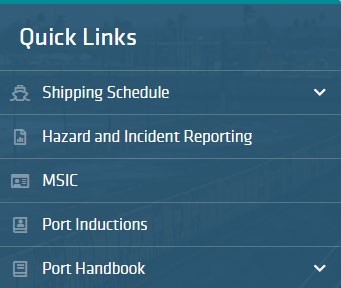
click on ‘Hazard and Incident
Reporting’. Or click through on the
‘Safety and Security’ tab.
Click on the ‘Hazard Report
Form’ button to open the
online form.
Access to Forms
Report a Hazard
Support


Hazards






1.
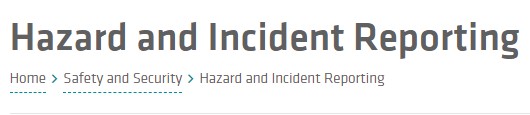
Summary -
Type in here a concise
description of the hazard identified
2.
Business Unit
–
Position the cursor in
this field and start typing the PPA
business area where the hazard was
spotted (e.g.
‘Landside’) and the
dropdown options will appear for
selection. Only one option can be
selected.
3.
Location
–
An extensive list of PPA
locations are available. Position the
cursor in the field and start typing in the
specific location of the hazard (e.g.
‘Tug
Pen’ or ‘Utah Point’ or Hedland) and
select the appropriate location.
4.
Impacted Business Unit(s)
(
optional
)
–
If e.g.
reporting a health and safety
hazard for ‘Maintenance’ as business
unit (BU), select here ‘Health and Safety’
as additional BU. More than one BU can
be added.
5.
Detailed Description
–
Type in here as
complete a description of the identified
hazard as possible.
From here the associated online forms can be accessed.
No log in or password is required to use the forms.
•
If you do not know with whom to speak from PPA when you identify a
hazard, or when an incident occurs, please contact:
•
Shipping Control Tower (Port Hedland): 08 9173 9030
•
Shipping Control Tower (Dampier & Ashburton): 08 9159 6556, or
•
Perth Reception: 08 6217 7112
Please note that the online reporting system does not substitute verbal
notification to PPA.
•
For questions or issues relating to the use of the online reporting forms
for hazards and incidents, please contact your PPA
Representative.

Access
Note: Click the icon next to the
heading to refer to the PPA
Consequence Matrix. Click to open
and click to close it again.
Report a Hazard

Hazards



6.
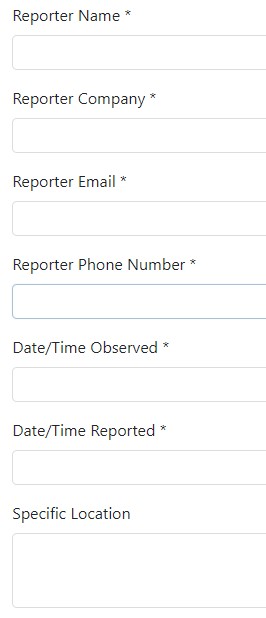
Reporter Name –
Fill in your name and
surname.
7.
Reporter Company
–
Fill in your company
name.
8.
Reporter Email
–
Fill in your email
address.
9.
Reporter Phone Number
–
Fill in your
contact phone number.
10.
Date/Time Observed
–
Click in here to
bring up a calendar view with fields to
record the date and time the hazard was
identified.
11.
Date/Time Reported
–
Record here the
current time, i.e.
the time the hazard is
being entered into the online form.
12.
Specific Location
(
optional) –
Use this
field to add details of the location, if
required.



13.
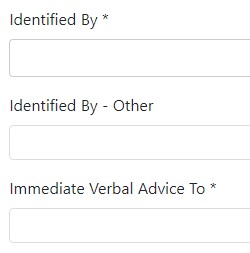
Identified By –
Select from the
dropdown list.
14.
Identified By –
Other
–
Fill in
details of how hazard was identified
if the appropriate option is not in
the dropdown list.
15.
Immediate Verbal Advice To
–
Fill
in the name and position of the PPA
representative to whom advice was
given.



16.
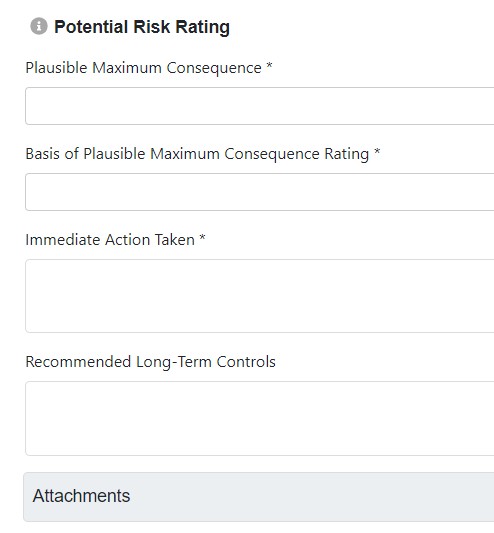
Plausible Maximum
Consequence (PMC) –
Select
from the dropdown options
the most severe impact that
could potentially result from
this hazard.
17.
Basis of Plausible Maximum
Consequence Rating
–
Select
from the dropdown options
the highest plausible risk
consequence category.
18.
Immediate Action Taken
–
Record the steps that have
been taken to control the
hazard.
19.
Recommended Long-Term
Controls
(
optional)
–
Fill in
any steps that may be
recommended to control the
hazard in the longer term.
20.
Attachments
–
to upload an
attachment, click ‘Add items’
Choose File.
->


Refer to the
Terms and Conditions
and
tick to agree.
Then click
Submit
.





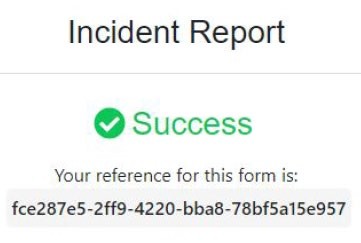
An acknowledgement message will
appear on the screen, with a
reference number.



Incidents
Click on the ‘Incident Report
Form’ button to open the
online form.




1.
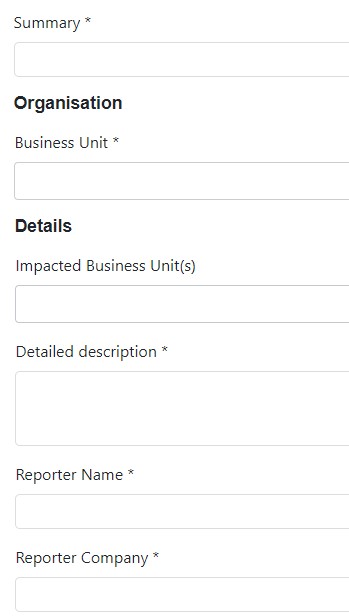
Summary -
Type in here a concise
description of the incident occurred.
2.
Business Unit
–
Position the cursor in
this field and start typing the PPA
business area where the incident
occurred (e.g. ‘Landside’) and the
dropdown options will appear for
selection. Only one option can be
selected.
3.
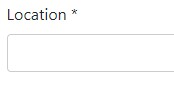
Location
–
An extensive list of PPA
locations are available. Position the
cursor in the field and start typing in the
specific location of the incident (e.g.
‘Bunker’ or ‘FMG’ or Hedland) and select
the appropriate location.
4.
Impacted Business Unit(s)
(
optional
)
–
If e.g. reporting an environmental
incident for ‘Marine’ as business unit
(
BU), select here ‘Environment’ as
additional BU. More than one BU can
be added.
5.
Detailed Description
–
Type in here as
complete a description of incident as
possible.
6.
Reporter Name –
Fill in your name and
surname.
7.
Reporter Company
–
Fill in your
company name.


8.
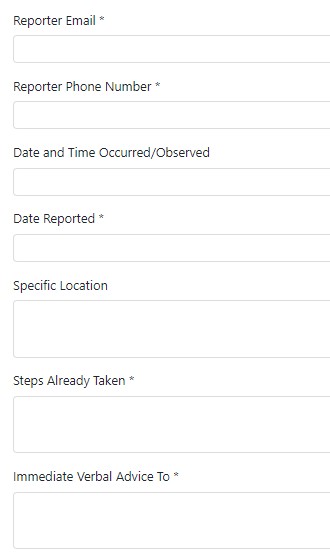
Reporter Email
–
Fill in your email
address.
9.
Reporter Phone Number
–
Fill in your
contact phone number.
10.
Date and Time Occurred/Observed
–
Click in here to bring up a calendar view
with fields to record the date and time
the incident occurred or was observed.
11.
Date/Time Reported
–
Record here the
current time, i.e. the time the incident is
being entered into the online form.
12.
Specific Location
optional) –
(
Use this
field to add details of the location, if
required.
13.
Steps Already Taken
-
Record the steps
that have been taken to mitigate the
effects of the incident.
14.
Immediate Verbal Advice To
–
Fill in
the name and position of the PPA
representative to whom advice of the
incident was given.


Incidents


15.
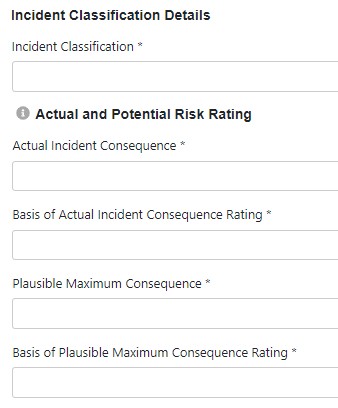
Incident Classification -
Select each
applicable incident classification type
from the list. (Note: If
'Near Miss'^
is
selected, no other classification may
be selected.)
16.
Actual Incident Consequence -
Select the highest Actual Incident
Consequence of the incident
classifications selected. (Note: If 'Near
Miss' is selected the Actual Incident
Consequence must be 'Insignificant’.)
17.
Basis of Actual Incident
Consequence Rating
-
Select from
the dropdown options the most
significant risk consequence
category.
18.
Plausible Maximum Consequence
PMC) –
(
Select from the dropdown
options the most severe impact that
could potentially result from this
incident.
19.
Basis of Plausible Maximum
Consequence Rating
–
Select from
the dropdown options the highest
plausible risk consequence category.
A
Near Miss
^
is defined as:
An unplanned event or loss of
control which does not result
in injury, illness, damage, or
any other impact, but with
potential to do so (excluding
Marine)


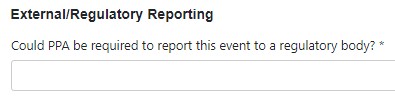
20.
External/Regulatory Reporting
–
Select ‘No’ or the name of the body
to whom the incident must be
reported.

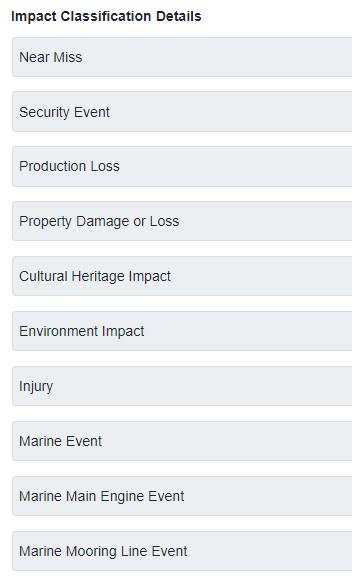


21.
Impact Classification Details
–
Fill in the
‘Impact Classification Details’ by clicking
‘Add Item’ next to the relevant Impact
heading.
•
The selected option should correlate
with the ‘Incident classification’
selected while creating the Incident, e.g.
if ‘Environment’ was selected as
Incident classification type, the
‘Environment’ option should be
selected under ‘Impact Classification
Details’.
•
If more than one incident classification
was selected, a matching impact
section should be completed for each
of the impact classifications.
•
Marine type incidents have specific
sections if the event relates to a ‘main
engine’ or ‘mooring line’ event; add the
specific item if relevant but also add
‘Marine Event’ to complete the vessel
and marine environmental data
required.
Note: Click the icon next to the heading to
refer to the PPA Consequence Matrix. Click
to open and click to close it again.



Incidents


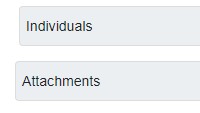
22.
Individuals
–
Add here the name
and details of all individuals
involved in the incident,
including details of any drug and
alcohol screening. Select ‘Yes’ if
screening was performed; ‘No’ if
screening should have been
performed but was not done;
N/A if screening was not
required.
23.
Attachments
–
Upload any
evidence relating to the incident
->
add item -> choose file.
Repeat to upload more files.




Refer to the
Terms and Conditions
and
tick to agree.
Then click
Submit
.




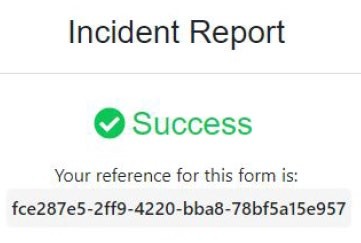
An acknowledgement message will
appear on the screen, with a reference
number.
Once submitted, the online hazard or incident form will be triaged into the PPA
hazard and incident management system. Please liaise with your PPA Representative
in the case of any queries. If further information is required from PPA side, you may
be contacted on the email or phone number provided in the form.